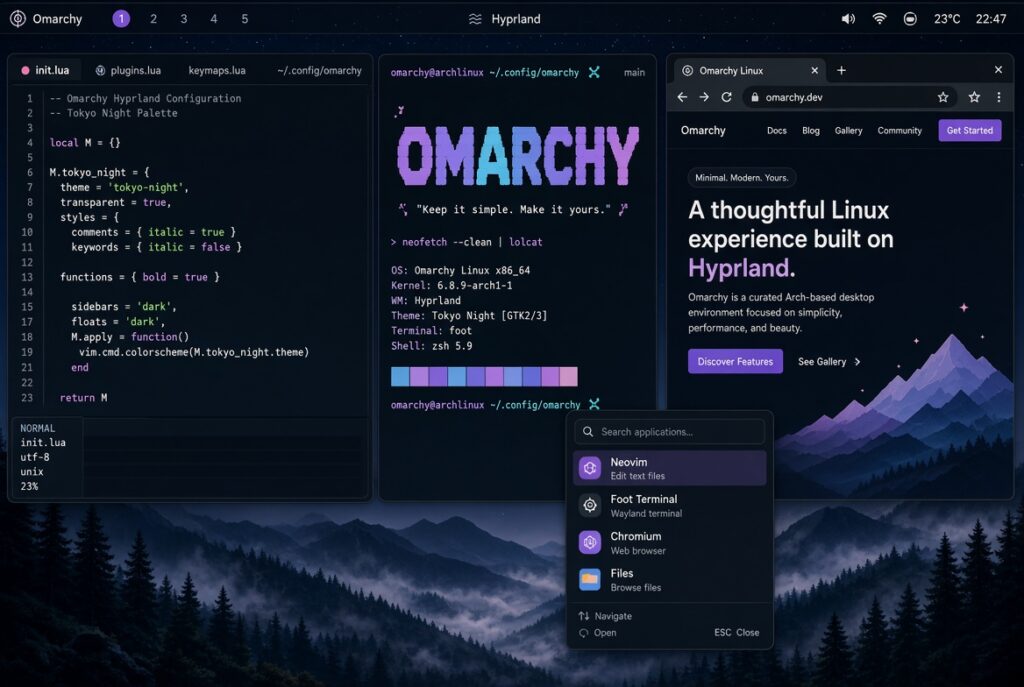
Omarchy Linux is an opinionated, preconfigured “omakase” (chef’s-choice) Arch Linux distribution created by David Heinemeier Hansson (DHH, of Ruby on Rails and 37signals/Basecamp fame). It delivers a polished, keyboard-driven desktop built around the Hyprland tiling window manager and (in the current 4.0 “Quattro” release) a unified Quickshell desktop shell.
The core idea is simple: give users DHH’s daily setup out of the box so they can be productive immediately instead of spending days or weeks “ricing” a raw Arch + Hyprland install. It ships a curated, themed collection of tools (Neovim, Alacritty + tmux, Chromium, Obsidian, LibreOffice, gaming stack, AI coding-agent launchers, and more) with zero bloat—just what DHH actually uses. The philosophy emphasizes that a beautiful system is a motivating one, and it leans fully into Linux’s strengths (terminal-heavy workflows, config-file editing, tiling windows) rather than trying to imitate Windows or macOS.
Technical foundation and user experience
- Base: Rolling-release Arch Linux with systemd, pacman, and btrfs + LUKS full-disk encryption by default.
- Desktop: Hyprland (Wayland tiling compositor) plus Quickshell (a Qt Quick toolkit that now unifies the bar, launcher, menus, notifications, lock screen, and more into one coherent, scriptable process). Earlier versions used separate tools like Waybar.
- Workflow: Heavily keyboard-centric. Super + Space opens a unified launcher/settings/command palette. There are no traditional desktop icons or dock. Windows tile automatically. Multiple beautiful themes (Tokyo Night is a common default) are included, and the bar can be dragged to any screen edge.
- Extras: Built-in screenshot/OCR text extraction, reminders, dictation, unified clipboard, gaming improvements (Steam, RetroArch, Lutris, etc.), and lazy-loaded AI coding agents. Updates are handled via a simple menu or CLI. Dual-boot support was added in 4.0.
Installation uses a custom ISO (under 6 GB in recent versions) that can finish in under a minute on fast hardware. Secure Boot/TPM usually must be disabled. It is not a beginner distro—users should be comfortable with Linux basics, the terminal, and occasional config tweaks.
Who it’s for (and who it isn’t)
Omarchy targets developers, power users, and Mac/Windows switchers who want a fast, aesthetic, highly efficient Linux desktop without the usual Arch setup tax. Reviews often note that it makes Hyprland actually usable and enjoyable rather than frustrating. It is not aimed at Linux newcomers who expect a familiar point-and-click experience like Ubuntu or Fedora with GNOME/KDE.
DHH positions it as a “malleable OS” that can evolve with AI agents and user customization while remaining opinionated enough to stay coherent. The project is MIT-licensed, hosted on GitHub under the Basecamp organization, and has grown quickly (tens of thousands of stars). An Omacom Foundation was recently launched to support it.
Official site and manual: omarchy.org. ISO downloads and changelog are on GitHub. It is a sister project to DHH’s earlier Ubuntu-based Omakub setup.
In short, Omarchy is DHH’s attempt to make a beautiful, ready-to-work Arch + Hyprland desktop that feels like a complete product rather than a kit of parts. If you like tiling window managers, keyboard workflows, and a strongly curated aesthetic, it is one of the most polished options available in 2026.