
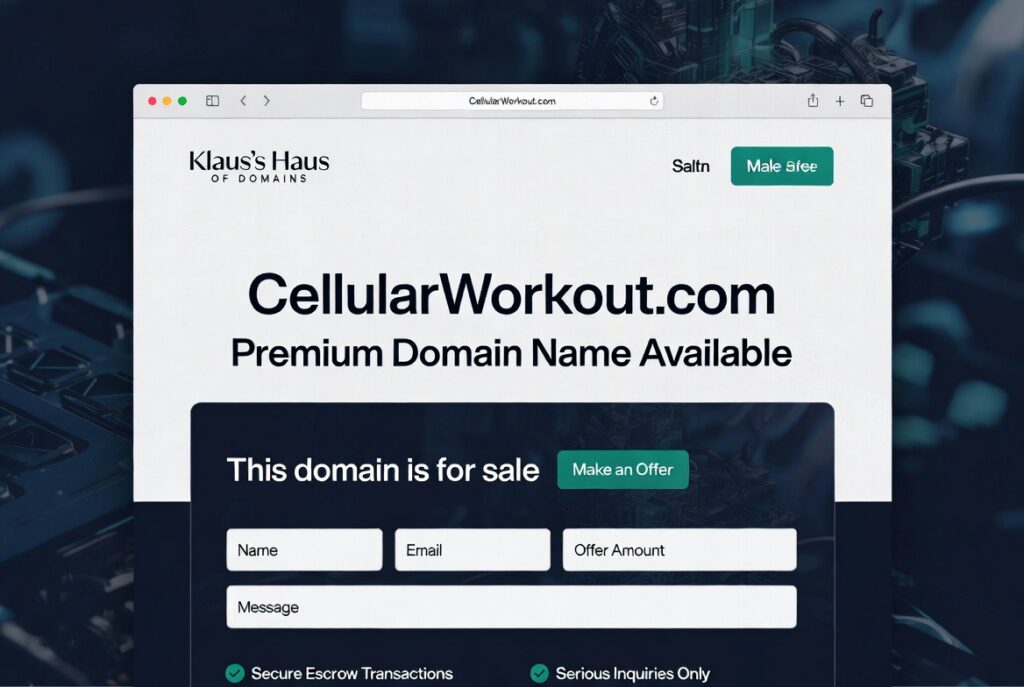
Core Concept
Run one central WordPress installation. All your for-sale domains point to it via DNS A records + hosting “Parked Domain / Alias” settings. A mapping plugin detects the visited domain and serves a custom “This domain is for sale” landing page.
This keeps everything under your control with professional branding and direct lead capture.
Plugin Stack
Best lightweight starting option:
- Each Domain a Page (free) — Simple domain-to-page mapping.
- Domain For Sale (free plugin on WordPress.org) — Professional landing page templates + built-in offer/inquiry forms and management dashboard.
- Elementor (free) or Gutenberg for design flexibility.
More powerful/flexible option:
- Domain Mapping System (free + Pro) instead of “Each Domain a Page”.
- Pair it with the free Domain For Sale plugin or the commercial Domain For Sale Pro (wpdomainforsale.com) for advanced sales features (Escrow integration, buyer tracking, etc.).
Other useful plugins:
- Page builder: Elementor or Spectra
- Forms: Built into the Domain For Sale plugin, or WPForms
- Caching: LiteSpeed Cache (if your host uses LiteSpeed) or WP Rocket
- Security: Solid Security or Wordfence
Step-by-Step Setup
1. Hosting & DNS Setup
- Choose a host that supports a high number (or unlimited) Parked Domains / Aliases and has good built-in SSL tools. A good option is GreenGeeks (affiliate sponsored link).
- For each for-sale domain:
- At your domain registrar, set the DNS (nameservers) – i.e. ns1.greengeeks.con,ns2.greengeeks.com
- In your hosting control panel (cPanel, hPanel, etc.), add the domain as a Parked Domain or Alias and point it to the document root of your main WordPress installation. This makes all domains load from the same WordPress files without redirecting.
- Use your hosting provider’s nameservers or your registrar’s DNS management. No third-party DNS service is required.
2. WordPress Installation
- Install WordPress on your main domain as a single site (not Multisite).
- Install and activate your chosen mapping plugin (Each Domain a Page or Domain Mapping System) plus the Domain For Sale plugin.
3. Domain Mapping Configuration
- Each Domain a Page (easiest): Create a page for each domain using the slug format yourdomain-com (dots become hyphens). Visiting the domain automatically loads that page.
- Domain Mapping System: Add each domain in the plugin settings and map it to the specific page or post you want visitors to see.
4. Create Professional For-Sale Landing Pages Use the Domain For Sale plugin to build clean, conversion-focused pages with:
- Prominent domain name display
- Clear “This domain is available” messaging
- Price or “Make an Offer” call-to-action
- Built-in inquiry/offer form (collects name, email, offer amount, message)
- Trust signals (Escrow.com, secure process, your branding)
- Responsive design that works on all devices
Efficiency tips for many domains:
- Build one master template → duplicate it for each new domain → customize price and description.
- Use Advanced Custom Fields (ACF) to manage extra details easily.
- Dynamically display the current domain name in headlines with simple PHP or shortcodes.
5. SSL Most quality hosting providers include Let’s Encrypt / Auto SSL that automatically covers parked and aliased domains.
- Check your host’s SSL/TLS or Security section — many have a one-click “Issue SSL” or “Auto SSL” feature that includes all parked domains.
- If your host doesn’t cover aliases automatically, contact their support (most good hosts handle this routinely for multiple domains).
- Always test with https:// after adding a new domain.
6. Main Portfolio Hub On your primary site (e.g. LoneStarDomains.com), create a clean portfolio or “Domains for Sale” page that lists all your domains and links to their individual landing pages. This creates a professional ecosystem.
You will now have:
- Full branding and design control
- Direct buyer inquiries (no middleman)
- Scalable to dozens or hundreds of domains
- One WordPress site to maintain instead of many separate ones
- Professional appearance that can improve conversion rates
You will NOT have the distribution reach and domain name surfacing of Afternic and Atom. You can still sell on those platforms, as long as you adhere to their (everchanging) listing rules. You would be taking on a lot of work, with no guarantee it will result in any better than simply parking on Afternic. It will almost certainly perform worse without putting significant resources behind trust and branding.
Important Notes
- Hosting resources matter — With a large portfolio, choose a plan with sufficient CPU, RAM, and PHP workers. Many domain investors eventually move to Cloudways, SiteGround GrowBig/GoGeek, or similar.
- Setup is front-loaded but becomes very fast once you have good templates.
- Always keep WordPress, themes, and plugins updated for security.
This version keeps the entire solution self-contained with your hosting provider.